
Motivation
The National Health and Nutrition Examination Survey (NHANES) is one of the most widely used public health datasets in the U.S., spanning over two decades of continuous data collection. Working with NHANES data directly from the CDC presents two recurring problems:
- Server reliability. The CDC’s data servers are frequently slow or unresponsive, which breaks reproducible workflows.
-
Cycle management. The CDC publishes data in
two-year cycles with letter suffixes (
DEMO,DEMO_B, …,DEMO_L). Combining cycles requires tracking naming conventions and reconciling type differences across waves.
nhanesdata addresses both issues by hosting
pre-merged, type-harmonized datasets on Cloudflare R2 with public
access. A single call to read_nhanes("demo") returns all
demographics data from 1999-2023 with a year column
identifying each survey cycle.
Acknowledgments
This package builds on the nhanesA package, which provides the underlying interface to NHANES data in R.
Installation
# install.packages("pak")
pak::pak("kyleGrealis/nhanesdata")Loading Data
#> Loading: DEMO
#> DEMO complete! (113,249 rows)
demo <- read_nhanes("demo")
glimpse(demo)
Every dataset includes two key columns:
-
year: Survey cycle start year (1999, 2001, 2003, …, 2017, 2021) -
seqn: Respondent sequence number (unique within a cycle, used for joining)
Dataset names are case-insensitive: "demo",
"DEMO", and "Demo" all work.
Example: Age Distribution Over Time
demo |>
  filter(!is.na(ridageyr)) |>
  ggplot(aes(x = ridageyr)) +
  geom_histogram(binwidth = 5, fill = "steelblue", color = "white") +
  facet_wrap(~year, ncol = 4) +
  labs(
    title = "NHANES Age Distribution by Survey Cycle",
    x = "Age (years)",
    y = "Count"
  ) +
  theme_minimal()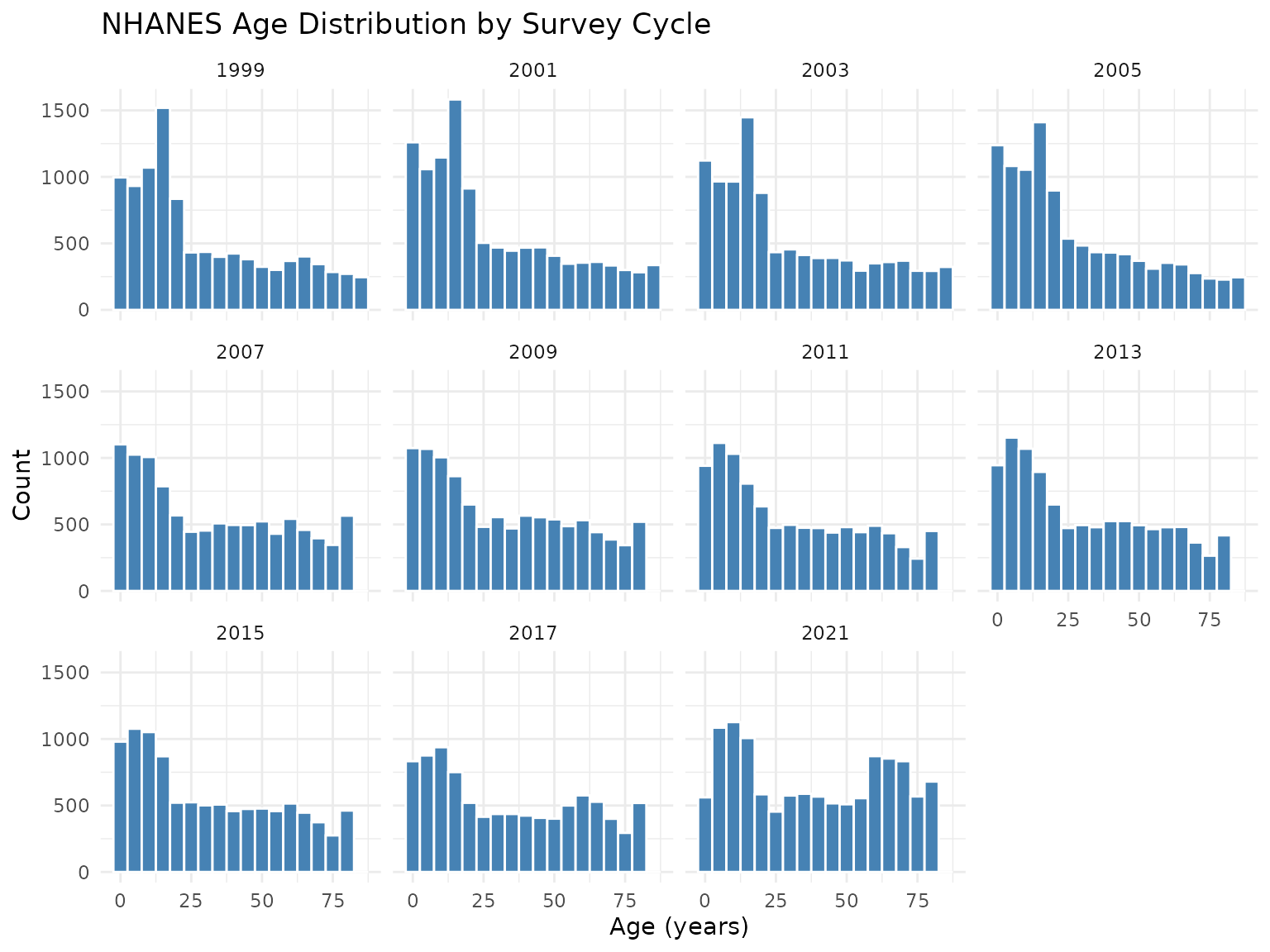
CDC Dataset Naming
When you call read_nhanes("demo"), you receive data that
the CDC publishes across multiple cycle-specific tables:
| CDC Table | Survey Years | Package Behavior |
|---|---|---|
| DEMO | 1999-2000 | Merged into a single demo dataset |
| DEMO_B | 2001-2002 | with a year column and |
| DEMO_C | 2003-2004 | harmonized data types |
| … | … | across all cycles. |
| DEMO_L | 2021-2023 |
This matters when you need CDC documentation for a specific variable.
Use get_url() to retrieve the codebook URL for any
cycle-specific table:
The 2019-2020 cycle (suffix K) is excluded from all datasets. See
vignette("covid-data-exclusion") for details.
Joining Multiple Datasets
Combine datasets using seqn and year as
join keys:
demo <- read_nhanes("demo")
bpx <- read_nhanes("bpx")
bmx <- read_nhanes("bmx")

analysis_data <- demo |>
  inner_join(bpx, by = c("seqn", "year")) |>
  inner_join(bmx, by = c("seqn", "year")) |>
  select(year, seqn, ridageyr, riagendr, bpxsy1, bmxbmi)
Always join on both seqn and
year. Each seqn is unique within its cycle,
and joining on both columns ensures participants are matched within the
same survey period.
Finding Variables
By keyword
term_search("blood pressure")Returns variable names, table names, descriptions, and collection
years. From there you can identify the base table name (e.g.,
BPX) for use with read_nhanes().
Complete Example: Blood Pressure by Age Group
demo <- read_nhanes("demo")
bpx <- read_nhanes("bpx")

bp_analysis <- demo |>
  filter(ridageyr >= 18) |>
  select(seqn, year, ridageyr, riagendr, ridreth1) |>
  inner_join(
    bpx |> select(seqn, year, bpxsy1, bpxdi1),
    by = c("seqn", "year")
  ) |>
  filter(!is.na(bpxsy1), !is.na(bpxdi1), bpxsy1 > 0, bpxdi1 > 0) |>
  mutate(
    age_group = cut(
      ridageyr,
      breaks = c(18, 30, 40, 50, 60, 70, 80, Inf),
      labels = c(
        "18-29", "30-39", "40-49", "50-59",
        "60-69", "70-79", "80+"
      ),
      right = FALSE
    )
  )

bp_summary <- bp_analysis |>
  group_by(age_group) |>
  summarize(
    n = n(),
    mean_systolic = mean(bpxsy1),
    mean_diastolic = mean(bpxdi1),
    .groups = "drop"
  )
bp_summary |>
  ggplot(aes(x = age_group)) +
  geom_col(aes(y = mean_systolic), fill = "coral", alpha = 0.7) +
  geom_col(aes(y = mean_diastolic), fill = "steelblue", alpha = 0.7) +
  labs(
    title = "Blood Pressure Increases with Age",
    subtitle = "Mean systolic (coral) and diastolic (blue) BP by age group",
    x = "Age Group",
    y = "Blood Pressure (mmHg)"
  ) +
  theme_minimal() +
  theme(axis.text.x = element_text(angle = 45, hjust = 1))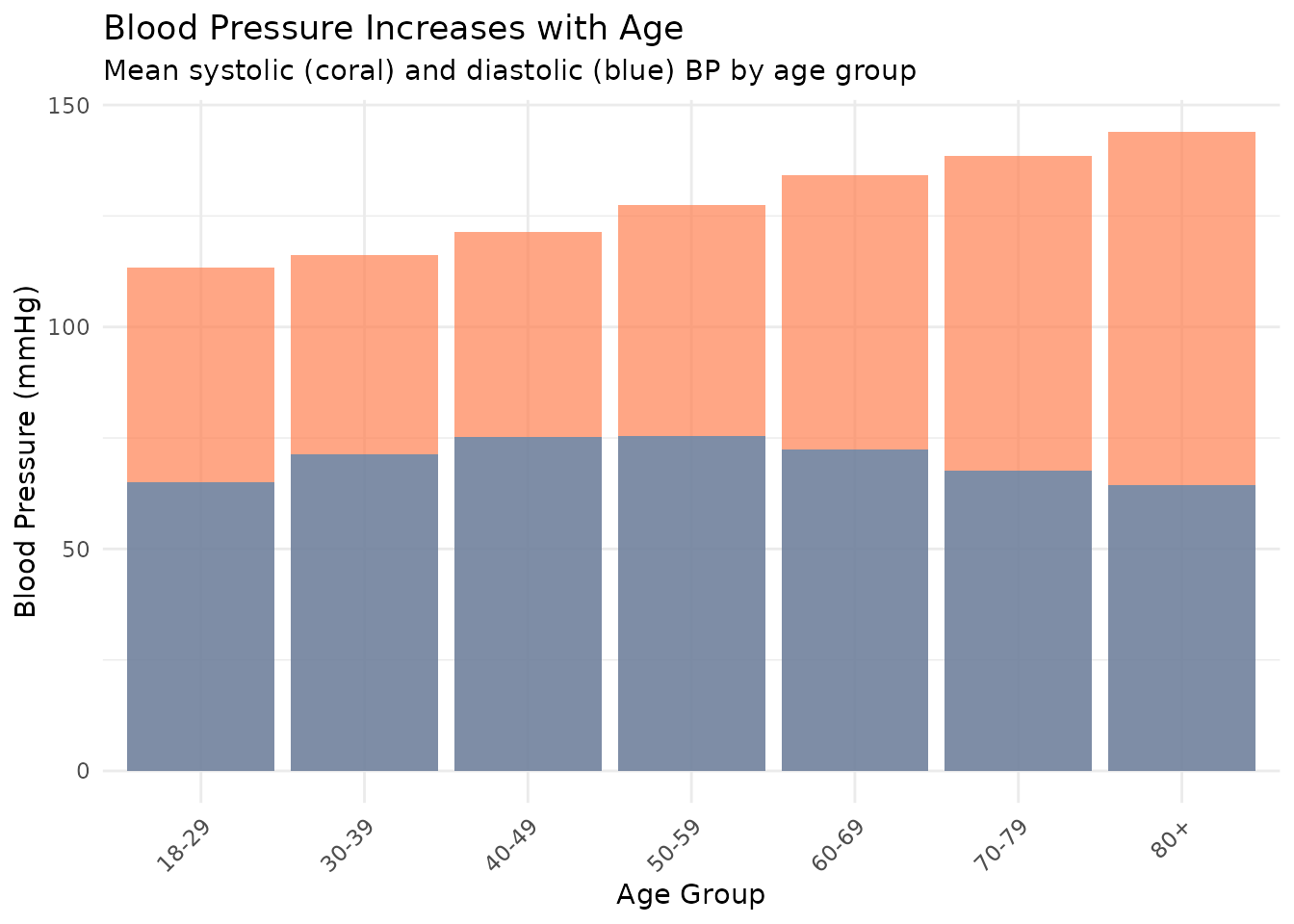
Next Steps
- Browse the dataset catalog for the full list of available tables
- Learn about creating survey design objects with proper weighting for multi-cycle analyses
- Read about the 2019-2020 cycle exclusion
- Use
?read_nhanesfor function documentation - File issues or feature requests on GitHub